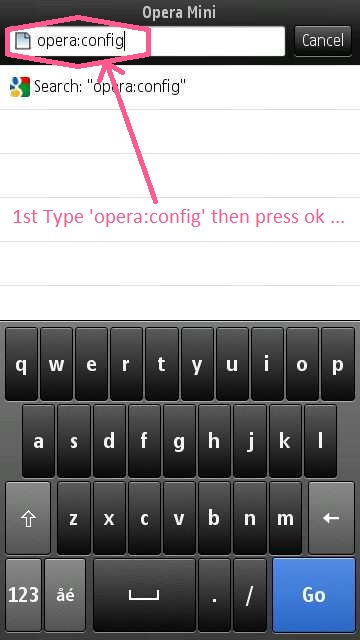
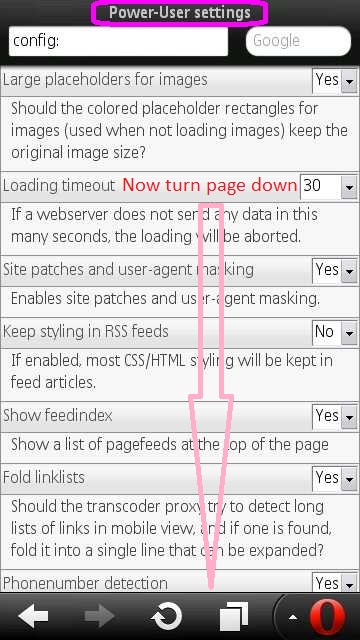
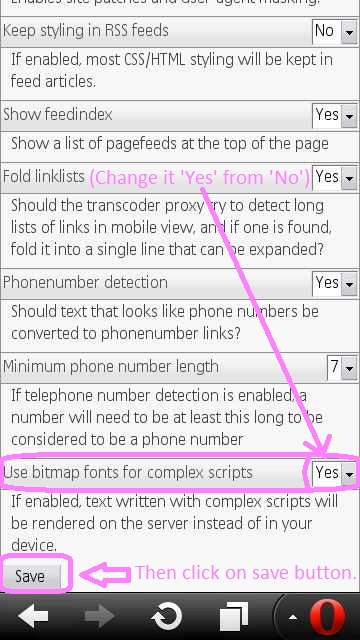
1. At 1st open your Operamini browser, then go to input address bar and type there 'opera:config' now press ok button... Follow images below, I snaped these images from my phone for your further details ... 2. After then you can see a 'power-user setting' page. Now turn page down....... 3. Turn page down untill u can see 'Use bitmap fonts for complex scripts' option. Then Change it 'Yes' from 'No'. Thats all, no need to do anything More, just press ok on save button and come out. 4. Now ur opera mini ready to show bangla font from any bangla websites as well as pc. To check click the link below.. >>Click here to see bangla text All version of Operamini & All java or symbian supported phone can run this trick successfuly! If u got any problem then contact with me via Email or post your problem on my blog section.